Imagine you want to enter a super-exclusive club. The security guard at the door won’t just let you in because you say who you are, you need a trusted ID badge.
In the online world, TLS certificates are those digital ID badges. They prove to your web browser that a website (like sathyapulse.in) is actually who it claims to be, so your connection stays secure and encrypted.
To make this system work without mass confusion, internet security relies on a Chain of Trust, structured like a tree:
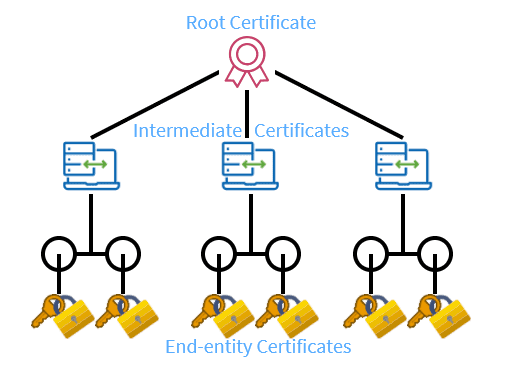
1. The Root Certificate (The Boss)
- What it is: The highest authority in the security chain.
- Think of the Root Authority as the President or the Government Office. Everyone knows and trusts them automatically because their trust stamp comes pre-installed inside your computer, phone, or browser (like Windows, macOS, Chrome, or iOS).
- Role: The Root Authority is kept locked away in a ultra-secure vault. It almost never interacts directly with websites because if its private key ever gets stolen, the entire global web trust system breaks.
- Example: Global Certificate Authorities like Let’s Encrypt Root (ISRG Root X1), DigiCert Global Root, or Sectigo.
2. The Intermediate Certificate (The Trusted Helpers)
- What it is: The middleman holding delegated power.
- Think of the Intermediate Authority as a Manager or Local Passport Office. The President (Root) hands the Manager an official stamp saying, “I trust you to issue ID badges on my behalf.”
- Role: They do the day-to-day work of verifying websites and handing out SSL certificates. If a hacker somehow breaks an Intermediate certificate, the Root can simply cancel that one manager’s power without destroying the whole system.
- Example: Let’s Encrypt R3 or DigiCert TLS RSA SHA256 2020 CA1.
3. The Leaf Certificate (The Name Tag on the Website)
- What it is: The actual end-entity certificate assigned to a specific domain name. It sits at the very end of the tree branch—hence the name “leaf”.
- This is your Personal ID Badge or School Student Card. It lists your exact name and cannot be used to issue ID cards to anyone else.
- Role: It lives directly on the web server hosting the website. It tells your browser: “This site is specifically
sathyapulse.in, and my identity was stamped by the trusted Manager!” - Example: A certificate issued explicitly for
sathyapulse.inor a wildcard certificate for*.sathyapulse.in(which covers subdomains likesub.sathyapulse.in).
The Chain of Trust
When you type https://sathyapulse.in into your browser, here is the secret conversation that happens behind the scenes in milliseconds:
- The website
sathyapulse.inhands your browser its Leaf Certificate. - Your browser asks: “Who issued this Leaf certificate?” The Leaf points up to the Intermediate Certificate (e.g., Let’s Encrypt R3).
- Your browser asks: “Can I trust this Intermediate?” It checks higher up and sees the Intermediate was signed by the Root Certificate (e.g., ISRG Root X1).
- Your browser checks its internal trust vault, sees the Root Certificate, and says: “Aha! I know this Root! The whole chain is verified!”
- The green padlock icon appears, and you are securely connected.